 English
 Español
 Français
- Home
- Passenger Counter
Know how many passengers board and alight at every stop
Automatic counter with 3D vision above every bus door. It counts boardings, alightings and occupancy in real time so you can set the frequency of each route with real data and control revenue fare by fare.
- Up to 98% accuracy*
- Frequencies based on real data
- Revenue control
- Live occupancy + GPS
One sensor above each door. Zero effort for the driver.
The counter is fitted to the ceiling above each door. When the door opens it starts counting and, when it closes, it sends the result.
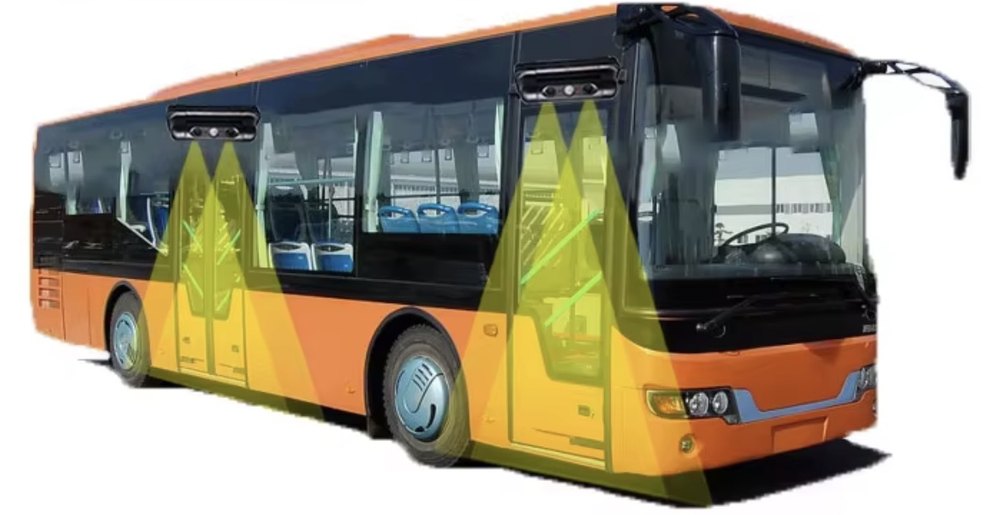 Rear doorFront door
The door opens
The counter receives the door-open signal and starts counting automatically.
It counts in 3D
The two cameras measure the height, volume and direction of each person: it knows whether they board or alight.
It sends the data
Boardings, alightings and occupancy reach the Vigilo platform with the stop, the time and the GPS position.
Accurate counting even when the bus is full
Binocular 3D vision
Two cameras calculate depth: it tells people apart by height and path, not by color.
People together or crossing
It counts correctly even when people board in groups, sideways or cross at the door.
Filters luggage and strollers
It ignores suitcases, bags and strollers, and lets you set a height limit so children are not counted if needed.
Day and night
It works in direct sunlight and in the dark: the infrared light switches on by itself when needed.
Stable on the move
Image stabilization and lens angle correction for a steady reading.
One-click calibration
It adjusts to the mounting height by itself and saves the settings. Quick, clean installation.
From the sensor to your decisions, in real time
Every stop is recorded with its time and position. Check occupancy live and analyze each route by time slot.
- Match supply to real demandReinforce peak hours and optimize frequencies with data, not estimates.
- Detect revenue leakageCompare counted passengers with tickets sold on each trip.
- Control capacitySee live occupancy and get alerts when a vehicle is full.
- Reports by route and stopExport reports by route, stop, driver and time slot.
Set better frequencies on every route
Stop scheduling runs by guesswork. The counter shows the real demand on each route by hour, by stop and by day of the week, so you can put the buses where the passengers are.
- Reinforce peak hoursMore runs where the buses are full and people are left waiting at the stop.
- Trim off-peak hoursFewer empty runs: save fuel, wear and driver hours.
- Stops that really payFind the stops with the most boardings and adjust the route and its timetable.
Keep tighter control of your revenue
Every passenger who boards is recorded. Compare the passengers counted with the fares sold or validated in your fare collection system and spot instantly where money is being lost.
| Bus | Driver | Counted | Validated | Not validated | Evasion |
|---|---|---|---|---|---|
| Bus 104 | Driver A | 612 | 605 | 7 | 1.1% |
| Bus 117 | Driver B | 585 | 531 | 54 | 9.2% |
| Bus 122 | Driver C | 640 | 634 | 6 | 0.9% |
| Bus 130 | Driver D | 498 | 451 | 47 | 9.4% |
Illustrative example. Demonstration figures, not from a real customer.
- Detect fare evasionAlerts when the passengers counted do not match the fares validated.
- Compare driversRanking by bus, route and shift. Objective data, no arguments.
- Deterrent effectWhen staff know that every passenger is counted, losses go down.
If a bus carries 600 passengers a day and only 5% do not pay, that is 30 unpaid fares a day: about 900 fares a month per bus. Multiply it by your fleet and by the price of the fare.
Much more than counting passengers
The counter data adds to everything the Vigilo platform already gives you: GPS position, routes, speed and alerts. One single screen to manage your fleet.
Occupancy control
Live occupancy of every bus and alerts when it is overloaded. Safer and more comfortable for passengers.
Ready-made reports
Reports by route, stop, driver and time slot, ready to export to Excel or PDF.
Every stop on the map
Boardings and alightings with time and GPS position. Check that every bus runs its route and makes its stops.
Profitability by route
Passengers per mile and per run: know which routes pay and which need rethinking.
Data for the authorities
Reliable ridership figures for the city, the transit agency, contracts and funding.
Better passenger service
Shorter waits at the stop and less crowded buses: happier passengers.
School transport
Know how many students get on and off at each stop. Peace of mind for schools and families.
API integration
Connect the data with your fare collection system, your accounting or your operations software.
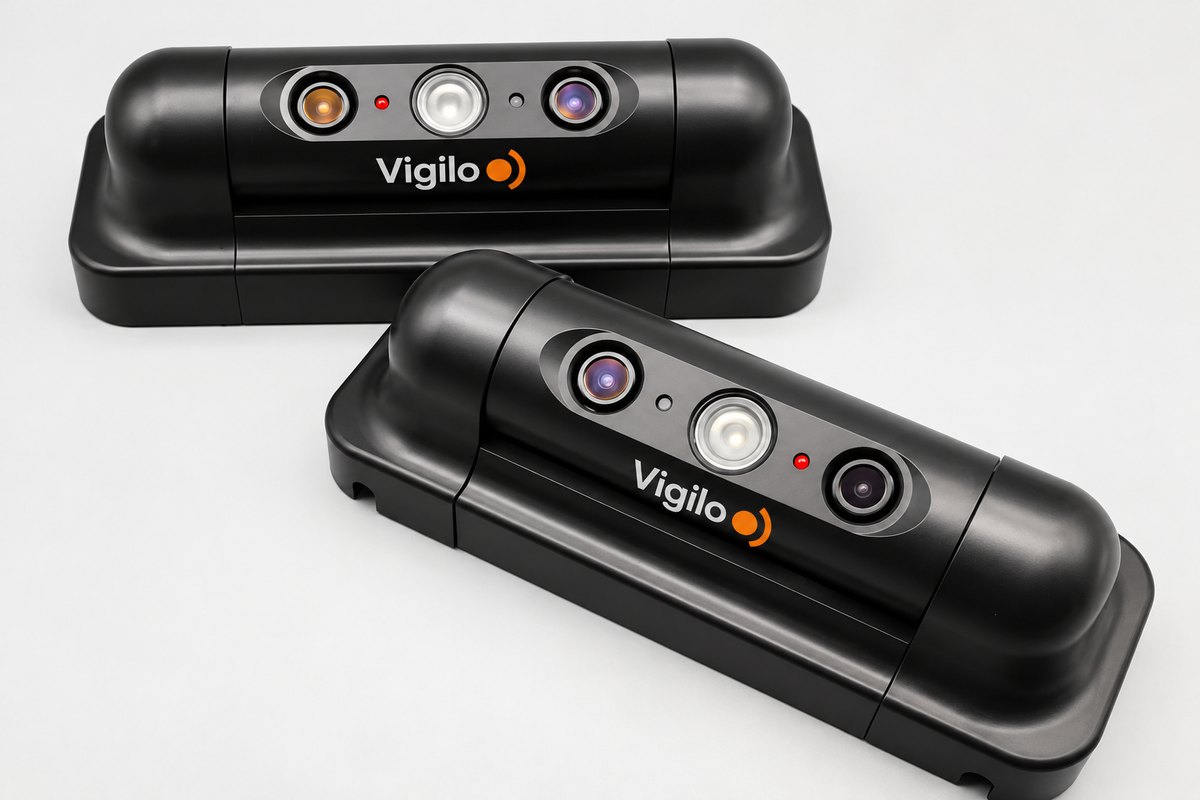
All in one, compact and built for buses
Cameras and processor in a single unit, with no extra boxes. It connects to the vehicle and to the Vigilo platform.
- Technology
- Binocular 3D vision with built-in video processor
- Accuracy
- 95% to 98%*
- Mounting height
- 1.9 to 2.2 m
- Door width
- Up to 1.2 m per unit
- Lighting
- 0.001 to 100,000 lux, with automatic infrared
- Temperature
- -35 °C to +70 °C
- Power
- 12–36 V DC · average consumption 3.6 W
- Connections
- RJ45 · RS485 / RS232 · video output · door signal
- Integration
- API and protocol for third-party systems
- Dimensions
- 178 × 65 × 58 mm
Designed for passenger transport
City buses
Occupancy by stop and time slot to plan routes and frequencies.
Intercity and charter
Passenger control on every service and reconciliation with ticket sales.
School transport
Know how many students board and alight at each stop on the route.
Shuttles and airports
Measure the real demand of each shuttle and adjust the fleet.
* Accuracy depends on the door type, the mounting height and the passenger flow.
Questions about the Passenger Counter
How does it help me set frequencies?
It shows the real demand on each route by stop, time slot and day of the week, so you can reinforce peak hours and cut runs that run almost empty.
Can I compare passengers with the fares sold?
Yes. With the data from your fare collection system, the platform compares passengers counted and fares validated by bus, route, driver and time slot, and alerts you when they do not match.
How many counters do I need?
One for each door where passengers board or alight. Each unit covers a door up to 1.2 m wide.
How accurate is it?
Between 95% and 98%, depending on the door type, the mounting height and the passenger flow. We advise you on the best position.
Does it work at night or with the sun in front?
Yes. It works from total darkness to direct sunlight; at night it switches on its infrared light automatically.
Does it count suitcases or strollers?
No. The system filters out luggage and lets you set a minimum height so it only counts people.
Where can I see the data?
In the Vigilo platform and app, together with the vehicle GPS location. You can also integrate it into your own system via API.
Want to know how many passengers each bus carries?
We will prepare a proposal based on the number of vehicles and doors.